
Claude Code 原理
从零开始构建一个 Claude Code,旨在梳理 Agent 的核心原理。
智能体循环
智能体循环其实就是 ReAct Agent 模式。
核心结构:
用户 → LLM → 工具执行 → 结果 → 回到 LLM → ...(循环)
直到:stop_reason != "tool_use",才结束循环。
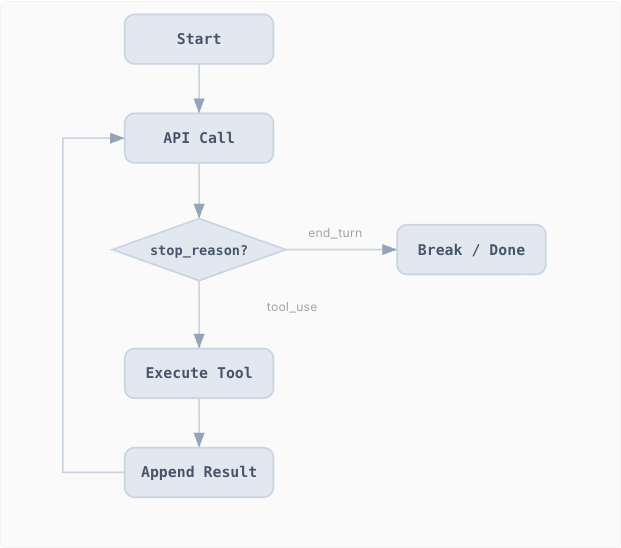
工作原理
初始化消息
const messages = [{ role: 'user', content: query }]调用 LLM
const response = client.messages.create({
  model,
  system,
  message,
  tools,
  max_tokens,
})
追加响应结果,检查
stop_reason判断是否结束messages.push({ role: 'assistant', content: response.content }) if (response.stop_reason != 'tool_use') return执行每个工具调用, 收集结果, 作为 user 消息追加。回到第 2 步。
const results = []

for (const block of response.content) {
  if (block.type === 'tool_use') {
    const output = runBash(block.input.command)

    results.push({
      type: 'tool_result',
      tool_use_id: block.id,
      content: output,
    })
  }
}

messages.push({
  role: 'user',
  content: results,
})
最终代码
import { execSync } from 'child_process'
import OpenAI from 'openai'

const client = new OpenAI({
  apiKey: process.env.OPENAI_API_KEY,
})

const MODEL = 'gpt-4.1' // 或你用的模型

// 一个最简单的 bash 工具
const TOOLS = [
  {
    type: 'function',
    function: {
      name: 'run_bash',
      description: 'Execute a shell command',
      parameters: {
        type: 'object',
        properties: {
          command: {
            type: 'string',
            description: 'Shell command to run',
          },
        },
        required: ['command'],
      },
    },
  },
]

// 执行 bash
function runBash(command) {
  try {
    const result = execSync(command, { encoding: 'utf-8' })
    return result
  } catch (err) {
    return err.message
  }
}

// Agent Loop
export async function agentLoop(query) {
  const messages = [{ role: 'user', content: query }]

  while (true) {
    const response = await client.chat.completions.create({
      model: MODEL,
      messages,
      tools: TOOLS,
    })

    const msg = response.choices[0].message

    // 追加 assistant 回复
    messages.push(msg)

    // 没有工具调用则直接结束
    if (!msg.tool_calls) {
      return msg.content
    }

    // 执行工具
    const toolResults = []

    for (const toolCall of msg.tool_calls) {
      if (toolCall.function.name === 'run_bash') {
        const args = JSON.parse(toolCall.function.arguments)

        const output = runBash(args.command)

        toolResults.push({
          role: 'tool',
          tool_call_id: toolCall.id,
          content: output,
        })
      }
    }

    // 把工具结果喂回模型
    messages.push(...toolResults)
  }
}
测试
import { agentLoop } from './agent.js'

const result = await agentLoop(
  'Create a file called hello.py that prints "Hello, World!"'
)

console.log(result)
工具使用 Tool Use
工具调用会有一个问题,就是不能保证 bash 工具执行是否成功,并且 shell 命令的调用并不可控,所以需要对工具进行一些改造。
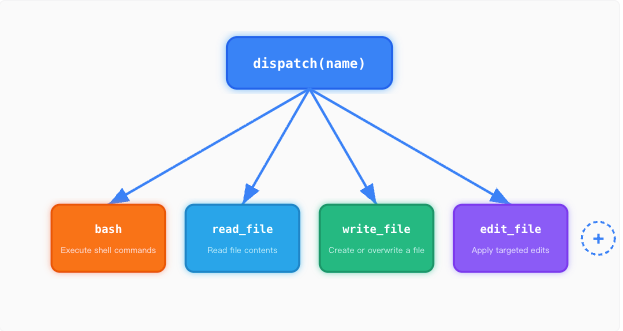
dispatch map 本质是一个对象:{ toolName: handlerFunction }。
dispatch 工作原理
每个工具有一个处理函数。路径沙箱防止逃逸工作区。
import path from 'path'
import fs from 'fs/promises'

const WORKDIR = path.resolve(process.cwd())

// 防止路径逃逸
function safePath(p) {
  const resolved = path.resolve(WORKDIR, p)

  if (!resolved.startsWith(WORKDIR)) {
    throw new Error(`Path escapes workspace: ${p}`)
  }

  return resolved
}

// 读取文件
export async function runRead(filePath, limit = null) {
  const fullPath = safePath(filePath)

  const text = await fs.readFile(fullPath, 'utf-8')
  let lines = text.split('\n')

  if (limit && limit < lines.length) {
    lines = lines.slice(0, limit)
  }

  return lines.join('\n').slice(0, 50000)
}
dispatch map 将工具名映射到处理函数。
// toolHandlers.js
import { runRead } from './tools/read.js'
import { runWrite } from './tools/write.js'
import { runEdit } from './tools/edit.js'
import { runBash } from './tools/bash.js'

export const TOOL_HANDLERS = {
  bash: async ({ command }) => runBash(command),

  read_file: async ({ path, limit }) => runRead(path, limit),

  write_file: async ({ path, content }) => runWrite(path, content),

  edit_file: async ({ path, old_text, new_text }) =>
    runEdit(path, old_text, new_text),
}
加入到 Agent 循环体中(完全不变):
import { TOOL_HANDLERS } from './toolHandlers.js'

async function handleResponse(response) {
  const results = []

  for (const block of response.content) {
    if (block.type === 'tool_use') {
      const handler = TOOL_HANDLERS[block.name]

      let output
      if (handler) {
        output = await handler(block.input)
      } else {
        output = `Unknown tool: ${block.name}`
      }

      results.push({
        type: 'tool_result',
        tool_use_id: block.id,
        content: output,
      })
    }
  }

  return results
}
增加 ToDoWrite 提醒系统
虽然基本的循环调用已经实现了,但是在多步骤任务中,大模型很容易丢失进度:
- 重复已经完成的步骤
- 跳过关键步骤
- 越做越偏
尤其是对话变长之后:
- 工具返回结果不断堆积
- 上下文被挤满
- 系统提示逐渐失效
因此需要引入一个带状态的 Todo 管理器(TodoManager),强制模型按步骤执行。
User → LLM → Tools(包含 todo)
             ↑       ↓
         tool_result(含 todo 状态)
                ↓
        TodoManager(状态机)
核心机制:
- 任务有状态(
pending/in_progress/done) - 同一时间只能有一个
in_progress - 如果模型太久不更新
todo,则自动提醒
ToDoWrite 实现原理
TodoManager 存储带状态的项目。同一时间只允许一个 in_progress。
class TodoManager {
  constructor() {
    // 存储当前所有任务
    this.items = []
  }

  /**
   * 更新 todo 列表
   * @param {Array} items - LLM 传入的任务数组
   * @returns {string} 渲染后的文本(返回给 LLM)
   */
  update(items) {
    // 存放“清洗后的任务”
    const validated = []

    // 统计当前有多少个任务是 in_progress
    let inProgressCount = 0

    // 遍历 LLM 传入的任务
    for (const item of items) {
      // 如果没写 status,默认是 pending
      const status = item.status || 'pending'

      // 统计正在进行的任务数量
      if (status === 'in_progress') {
        inProgressCount++
      }

      // 只保留我们允许的字段(防止 LLM 乱传)
      validated.push({
        id: item.id, // 任务 id
        text: item.text, // 任务描述
        status: status, // 状态
      })
    }

    // 核心约束:只能有一个任务在进行中
    if (inProgressCount > 1) {
      throw new Error('Only one task can be in_progress')
    }

    // 保存当前状态
    this.items = validated

    // 返回渲染后的文本(给 LLM 看)
    return this.render()
  }

  /**
   * 把任务渲染成文本
   * 例如:
   * [ ] task A
   * [>] task B
   * [x] task C
   */
  render() {
    return this.items
      .map((item) => {
        let mark

        // 根据状态选择标记
        switch (item.status) {
          case 'done':
            mark = '[x]'
            break
          case 'in_progress':
            mark = '[>]'
            break
          default:
            mark = '[ ]'
        }

        return `${mark} ${item.text}`
      })
      .join('\n')
  }
}
TODO 的工具注册
const TODO = new TodoManager()

const TOOL_HANDLERS = {
  // ...其他工具

  todo: async ({ items }) => {
    return TODO.update(items)
  },
}
Nag Reminder(自动提醒机制)。如果模型连续 3 轮没有调用 todo,系统自动插入提醒:
function injectReminder({ roundsSinceTodo, messages }) {
  if (roundsSinceTodo >= 3 && messages.length > 0) {
    const last = messages[messages.length - 1]

    if (last.role === 'user' && Array.isArray(last.content)) {
      last.content.unshift({
        type: 'text',
        text: '<reminder>Update your todos.</reminder>',
      })
    }
  }
}
ToDoWrite 基本实现
let roundsSinceTodo = 0

async function agentLoop(messages) {
  while (true) {
    injectReminder({ roundsSinceTodo, messages })

    const response = await callLLM(messages)

    if (response.tool_call) {
      const { name, args } = response.tool_call

      const result = await TOOL_HANDLERS[name](args)

      messages.push({
        role: 'tool',
        content: result,
      })

      if (name === 'todo') {
        // 当前轮执行了 todo,重置计数
        roundsSinceTodo = 0
      } else {
        // 没有执行 todo,增加计数
        roundsSinceTodo++
      }
    } else {
      break
    }
  }
}
子智能体 Subagents
当智能体运行时间越长,messages 数组会越来越大。这时可以考虑引入子智能体(Subagent)来分担任务。
Parent agent                     Subagent
+------------------+             +------------------+
| messages=[...]   |             | messages=[]      | ← 全新上下文
|                  |  dispatch   |                  |
| tool: task       | ----------> | while tool_use:  |
|   prompt="..."   |             |   call tools     |
|                  |  summary    |   append results |
|   result="..."   | <---------- | return last text |
+------------------+             +------------------+
核心原理是:
- 父智能体:保持干净上下文
- 子智能体:负责“脏活累活”
- 子智能体结束后:上下文直接丢弃
子智能体实现
工具定义: 父智能体拥有一个额外的
task工具,子智能体不能再生成子任务(防止递归)。const CHILD_TOOLS = [ { name: "read_file", ... }, { name: "run_command", ... } ]; const PARENT_TOOLS = [ ...CHILD_TOOLS, { name: 'task', description: '生成一个具有全新上下文的 Subagent 来完成一个子任务', input_schema: { type: 'object', properties: { prompt: { type: 'string' }, }, required: ['prompt'], }, }, ] // 设计上:父智能体不能主动使用这些工具,存在是为了复用工具 if (agentType === "parent" && tool !== "task") { throw new Error("Parent cannot call this tool"); }子智能体执行逻辑: 子智能体以
messages=[]启动, 运行自己的循环。只有最终文本返回给父智能体。async function runSubagent(prompt) { let subMessages = [{ role: 'user', content: prompt }] let finalResponse = null for (let i = 0; i < 30; i++) { // safety limit const response = await client.messages.create({ model: MODEL, system: SUBAGENT_SYSTEM, messages: subMessages, tools: CHILD_TOOLS, max_tokens: 8000, }) finalResponse = response // 保存 assistant 输出 subMessages.push({ role: 'assistant', content: response.content, }) // 如果没有工具调用,结束 if (response.stop_reason !== 'tool_use') { break } let results = [] for (const block of response.content) { if (block.type === 'tool_use') { const handler = TOOL_HANDLERS[block.name] if (!handler) continue const output = await handler(block.input) results.push({ type: 'tool_result', tool_use_id: block.id, content: String(output).slice(0, 50000), }) } } // 把工具结果喂回模型 subMessages.push({ role: 'user', content: results, }) } // 提取最终文本 const text = (finalResponse.content || []) .filter((b) => b.type === 'text') .map((b) => b.text) .join('') return text || '(no summary)' }
Skills
工具过多后,智能体可能会不清楚每个工具的作用。即“需要用到什么知识,就加载什么知识”
而不是把所有知识塞进 system prompt,而是通过 tool_result 动态注入。
基本原理是采用两层结构,一层是系统提示词,始终存在;另一层是技能提示词,根据需要动态加载。
System prompt (Layer 1,只放技能名称 + 简短描述(低成本)):
+--------------------------------------+
| You are a coding agent.              |
| Skills available:                    |
|   - git: Git workflow helpers        |
|   - test: Testing best practices     |
+--------------------------------------+


tool_result (Layer 2,当模型调用时加载):
+--------------------------------------+
| <skill name="git">                   |
| Full git workflow instructions...    |
| Step 1: ...                          |
| </skill>                             |
+--------------------------------------+
skills 目录结构为:
skills/
  pdf/
    SKILL.md
  code-review/
    SKILL.md
每个 SKILL.md:
---
name: code-review
description: Review code quality
---

# Code Review Guide

Step 1: ...
Step 2: ...
Skills 实现原理
SkillLoader 递归扫描 SKILL.md 文件, 用目录名作为技能标识。
import fs from 'fs'
import path from 'path'

export class SkillLoader {
  constructor(skillsDir) {
    this.skills = {}
    this.loadSkills(skillsDir)
  }

  loadSkills(dir) {
    const walk = (currentPath) => {
      const files = fs.readdirSync(currentPath)

      for (const file of files) {
        const fullPath = path.join(currentPath, file)
        const stat = fs.statSync(fullPath)

        if (stat.isDirectory()) {
          walk(fullPath)
        } else if (file === 'SKILL.md') {
          const text = fs.readFileSync(fullPath, 'utf-8')
          const { meta, body } = this.parseFrontmatter(text)

          const name = meta.name || path.basename(path.dirname(fullPath))

          this.skills[name] = {
            meta,
            body,
          }
        }
      }
    }

    walk(dir)
  }

  parseFrontmatter(text) {
    const match = text.match(/^---\n([\s\S]*?)\n---\n([\s\S]*)$/)

    if (!match) {
      return { meta: {}, body: text }
    }

    const yaml = match[1]
    const body = match[2]

    const meta = {}
    yaml.split('\n').forEach((line) => {
      const [key, ...rest] = line.split(':')
      if (key) {
        meta[key.trim()] = rest.join(':').trim()
      }
    })

    return { meta, body }
  }

  getDescriptions() {
    return Object.entries(this.skills)
      .map(([name, skill]) => {
        const desc = skill.meta.description || ''
        return `  - ${name}: ${desc}`
      })
      .join('\n')
  }

  getContent(name) {
    const skill = this.skills[name]

    if (!skill) {
      return `Error: Unknown skill '${name}'.`
    }

    return `<skill name="${name}">{skill.body}</skill>`
  }
}
第一层,注入到系统提示词中:
const skillLoader = new SkillLoader('./skills')

const SYSTEM = `You are a coding agent.
Skills available:
${skillLoader.getDescriptions()}`
第二层,其实也是一个 dispatch map 工具。 在工具调用时动态加载:
const TOOL_HANDLERS = {
  // 其他工具...

  load_skill: ({ name }) => {
    return skillLoader.getContent(name)
  },
}
上下文压缩 context compact
由于 LLM 的上下文窗口是有限的,因此需要管理上下文,让 Agent 能长期运行而不崩。
这里采用三层上下文压缩机制,逐层增强:
Every turn:
+------------------+
| Tool call result |
+------------------+
        |
        v
[Layer 1: micro_compact]        (每轮执行,静默)
  老的 tool_result → 占位符
        |
        v
[Check: tokens > 50000?]
   |               |
   no              yes
   |               |
   v               v
continue    [Layer 2: auto_compact]
              保存完整对话
              LLM 生成摘要
              用 summary 替换上下文
                    |
                    v
            [Layer 3: manual compact]
              模型主动调用 compact
第一层轻量压缩
目标是:清理旧的 tool 返回结果,节省 token,但不丢失关键信息。
function microCompact(messages, keepRecent = 3) {
  const toolResults = []

  messages.forEach((msg, i) => {
    if (msg.role === 'user' && Array.isArray(msg.content)) {
      msg.content.forEach((part, j) => {
        if (part?.type === 'tool_result') {
          toolResults.push({ i, j, part })
        }
      })
    }
  })

  if (toolResults.length <= keepRecent) return messages

  // 压缩较旧的 tool result
  const toCompact = toolResults.slice(0, -keepRecent)

  toCompact.forEach(({ part }) => {
    const content = part.content || ''
    if (content.length > 100) {
      const toolName = part.tool_name || 'tool'
      part.content = `[Previous: used ${toolName}]`
    }
  })

  return messages
}
第二层自动压缩
当 token 超过阈值时,自动调用 LLM 生成摘要(summary),替换上下文。
import fs from 'fs/promises'
import path from 'path'

async function autoCompact(messages, client, MODEL, TRANSCRIPT_DIR) {
  // 1. 保存 transcript
  const fileName = `transcript_${Date.now()}.jsonl`
  const filePath = path.join(TRANSCRIPT_DIR, fileName)

  const lines = messages.map((msg) => JSON.stringify(msg)).join('\n')
  await fs.writeFile(filePath, lines, 'utf-8')

  // 2. 调用 LLM 做摘要
  const prompt =
    'Summarize this conversation for continuity:\n\n' +
    JSON.stringify(messages).slice(0, 80000)

  const response = await client.messages.create({
    model: MODEL,
    messages: [{ role: 'user', content: prompt }],
    max_tokens: 2000,
  })

  const summary = response.content?.[0]?.text || 'Summary unavailable'

  // 3. 替换上下文
  return [
    {
      role: 'user',
      content: `[Compressed]\n\n${summary}`,
    },
    {
      role: 'assistant',
      content: 'Understood. Continuing.',
    },
  ]
}
第三层手动压缩
主动优化,由模型“主动决定”触发压缩,适用于模型认为需要压缩但又不满足自动压缩条件的情况。
例如,当模型“感觉上下文开始混乱”或者即将执行复杂任务前, 可以主动调用 manual_compact 工具来压缩上下文。
async function manualCompact(messages, client, MODEL, TRANSCRIPT_DIR) {
  return await autoCompact(messages, client, MODEL, TRANSCRIPT_DIR)
}
三层压缩整合进 Agent 主循环
async function agentLoop(messages, client, config) {
  const { MODEL, THRESHOLD = 50000, TRANSCRIPT_DIR } = config

  while (true) {
    // Layer 1: 每轮压缩
    microCompact(messages)

    // Layer 2: 自动压缩
    if (estimateTokens(messages) > THRESHOLD) {
      const newMessages = await autoCompact(
        messages,
        client,
        MODEL,
        TRANSCRIPT_DIR
      )
      messages.splice(0, messages.length, ...newMessages)
    }

    // 调用 LLM
    const response = await client.messages.create({
      model: MODEL,
      messages,
    })

    // TODO: 工具执行逻辑
    // const toolUsed = ...

    // Layer 3: 手动触发
    if (response?.needs_compact) {
      const newMessages = await manualCompact(
        messages,
        client,
        MODEL,
        TRANSCRIPT_DIR
      )
      messages.splice(0, messages.length, ...newMessages)
    }

    messages.push(response)
  }
}
任务系统 Task System
此前的 TodoManager 只能管理单一维度的任务状态,无法处理复杂的多维度任务关系。真实的任务可能是:
- B 依赖 A
- C 和 D 可以并行
- E 依赖 C + D
解决方案是升级为任务图(Task Graph / DAG)+ 磁盘持久化。
每个任务就是一个 JSON 文件:
.tasks/
  task_1.json
  task_2.json
任务的字段结构可为:
{
  "id": 1, // 任务 ID
  "subject": "task name", // 任务名称
  "status": "pending", // pending / in_progress / done
  "blockedBy": [], // 依赖的任务 ID 列表
  "blocks": [], // 被哪些任务依赖的 ID 列表
  "owner": "" // 负责这个任务的智能体(如果有多个智能体)
}
重构任务管理
import { promises as fs } from 'fs'
import path from 'path'

// 任务管理器:负责任务的创建、读取、存储(基于文件系统)
export class TaskManager {
  constructor(tasksDir) {
    // 任务存储目录(例如 ./.tasks)
    this.dir = tasksDir
  }

  // 初始化任务系统(创建目录 + 计算下一个任务 ID)
  async init() {
    // recursive: true → 目录不存在时自动创建
    await fs.mkdir(this.dir, { recursive: true })

    // nextId = 当前最大 id + 1(避免重复)
    this.nextId = (await this._maxId()) + 1
  }

  // 扫描目录,找出当前最大的 task id
  async _maxId() {
    // 如果目录不存在,返回空数组(避免报错)
    const files = await fs.readdir(this.dir).catch(() => [])

    const ids = files
      // 匹配 task_1.json 这种格式
      .map((f) => f.match(/task_(\d+)\.json/))
      .filter(Boolean)
      // 提取数字 id
      .map((m) => parseInt(m[1], 10))

    // 如果没有任务,返回 0
    return ids.length ? Math.max(...ids) : 0
  }

  // 根据 id 生成文件路径
  _filePath(id) {
    return path.join(this.dir, `task_${id}.json`)
  }

  // 保存任务到磁盘(覆盖写)
  async _save(task) {
    await fs.writeFile(
      this._filePath(task.id),
      JSON.stringify(task, null, 2) // 美化 JSON,方便调试
    )
  }

  // 从磁盘读取任务
  async _load(id) {
    const content = await fs.readFile(this._filePath(id), 'utf-8')
    return JSON.parse(content)
  }

  // 创建新任务
  async create(subject, description = '') {
    const task = {
      id: this.nextId,
      subject,
      description,

      // 初始状态:待执行
      status: 'pending',

      // 依赖当前任务的前置任务(谁挡着我)
      blockedBy: [],

      // 当前任务完成后会解锁谁(我挡着谁)
      blocks: [],

      // 预留字段(未来多 agent 用)
      owner: '',
    }

    await this._save(task)

    // 自增 id,保证唯一性
    this.nextId += 1

    return JSON.stringify(task, null, 2)
  }
}
当任务完成时,移除其他任务中的依赖,并更新转态:
// 清理依赖关系:当某个任务完成时调用
async _clearDependency(completedId) {
  const files = await fs.readdir(this.dir);

  for (const file of files) {
    // 只处理任务文件
    if (!file.startsWith("task_")) continue;

    const fullPath = path.join(this.dir, file);
    const task = JSON.parse(await fs.readFile(fullPath, "utf-8"));

    // 如果这个任务依赖已完成的任务
    if (task.blockedBy?.includes(completedId)) {
      // 从依赖列表中移除 → 表示“解锁”
      task.blockedBy = task.blockedBy.filter(id => id !== completedId);

      // 保存更新后的任务
      await this._save(task);
    }
  }
}


// 更新任务:状态 + 依赖关系
async update(taskId, { status, addBlockedBy, addBlocks } = {}) {
  const task = await this._load(taskId);

  // ===== 状态更新 =====
  if (status) {
    task.status = status;

    // 如果任务完成 → 自动解锁后续任务
    if (status === "completed") {
      await this._clearDependency(taskId);
    }
  }

  // ===== 添加“被谁阻塞” =====
  if (addBlockedBy) {
    // 注意:这里没有去重,调用方需要保证合理性
    task.blockedBy.push(...addBlockedBy);
  }

  // ===== 添加“阻塞谁” =====
  if (addBlocks) {
    task.blocks.push(...addBlocks);
  }

  await this._save(task);

  return JSON.stringify(task, null, 2);
}
加入到工具调用中:
// 初始化全局任务管理器
const TASKS = new TaskManager("./.tasks");
await TASKS.init();

// 工具分发:给 agent 调用
export const TOOL_HANDLERS = {
  // 创建任务
  task_create: async ({ subject }) =>
    TASKS.create(subject),

  // 更新任务(主要用于改状态)
  task_update: async ({ task_id, status }) =>
    TASKS.update(task_id, { status }),

  // 获取所有任务(用于构建任务图)
  task_list: async () =>
    TASKS.listAll(),

  // 获取单个任务详情
  task_get: async ({ task_id }) =>
    TASKS.get(task_id),
};


// 列出所有任务(读取整个任务目录)
async listAll() {
  const files = await fs.readdir(this.dir);
  const tasks = [];

  for (const file of files) {
    // 只处理 task_*.json 文件
    if (!file.startsWith("task_")) continue;

    const task = JSON.parse(
      await fs.readFile(path.join(this.dir, file), "utf-8")
    );

    tasks.push(task);
  }

  return tasks;
}

// 获取单个任务
async get(taskId) {
  return this._load(taskId);
}
后台任务 Background Tasks
有些命令要跑好几分钟: npm install、jest、docker build。agent 会被卡住,无法同时处理多个任务。这样的用户体验很差(不能“边做边想”)。为此需要引入后台任务机制。
Main thread (event loop)        Background workers
+------------------------+      +----------------------+
| agent loop             |      | child_process.exec   |
| ...                    |      | ...                  |
| [LLM call] <----------+------| enqueue(result)      |
|   ^ drain queue        |      +----------------------+
+------------------------+

Timeline:
Agent --[spawn A]--[spawn B]--[other work]----
             |          |
             v          v
          [A runs]   [B runs]   (parallel async)
             |          |
             +-- results injected before next LLM call --+
实现步骤
后台任务管理用通知队列进行处理
const { exec } = require('child_process')
const { randomUUID } = require('crypto')

class BackgroundManager {
  constructor() {
    // 存储所有任务状态: taskId -> { status, command, result? }
    this.tasks = new Map()

    // 通知队列:用于在主循环中“注入”后台结果
    this.notificationQueue = []
  }

  // 启动后台任务(非阻塞)
  run(command) {
    // 生成短 task id(方便在对话中引用)
    const taskId = randomUUID().slice(0, 8)

    // 标记任务开始
    this.tasks.set(taskId, {
      status: 'running',
      command,
    })

    // 异步执行命令(不会阻塞主线程)
    exec(command, { timeout: 300000 }, (error, stdout, stderr) => {
      let output

      // 处理超时
      if (error && error.killed) {
        output = 'Error: Timeout (300s)'
      } else {
        // 合并 stdout + stderr,并限制最大长度(防止爆内存)
        output = (stdout + stderr).trim().slice(0, 50000)
      }

      // 更新任务状态
      this.tasks.set(taskId, {
        status: 'done',
        command,
        result: output,
      })

      // 推入通知队列(只保留前 500 字符用于提示)
      this.notificationQueue.push({
        taskId,
        result: output.slice(0, 500),
      })
    })

    // 立即返回,不等待执行完成
    return `Background task ${taskId} started`
  }

  // 取出所有已完成任务的通知(并清空队列)
  drainNotifications() {
    const notifs = [...this.notificationQueue]

    // 清空队列,避免重复注入
    this.notificationQueue = []

    return notifs
  }
}
最后加入到 Agent Loop 中,每轮调用 LLM 前都注入结果。
async function agentLoop(messages, client, bgManager) {
  while (true) {
    const notifs = bgManager.drainNotifications()

    if (notifs.length > 0) {
      const notifText = notifs
        .map((n) => `[bg:${n.taskId}] ${n.result}`)
        .join('\n')

      messages.push({
        role: 'user',
        content: `<background-results>\n${notifText}\n</background-results>`,
      })

      messages.push({
        role: 'assistant',
        content: 'Noted background results.',
      })
    }

    const response = await client.messages.create({
      messages,
      // ...其他参数
    })

    // 处理 response...
  }
}
Agent 团队
在之前的版本中,子智能体是一次性的(调用完就销毁)。没有身份(state 丢失),没有跨调用记忆。后台任务只能执行命令,不能做 LLM 决策。
真正的团队协作需要三样东西:
- 能跨多轮对话存活的持久智能体
- 身份和生命周期管理
- 智能体之间的通信通道。
Teammate lifecycle:
  spawn -> WORKING -> IDLE -> WORKING -> ... -> SHUTDOWN

Communication:
  .team/
    config.json
    inbox/
      alice.jsonl
      bob.jsonl
      lead.jsonl

             send("alice","bob")
   +--------+ --------------------> +--------+
   | alice  |                      |  bob   |
   | loop   |   bob.jsonl << msg   |  loop  |
   +--------+                      +--------+

        BUS.readInbox("alice")
实现原理
使用 Node.js 文件系统维护团队状态。
import fs from 'fs/promises'
import path from 'path'

export class TeammateManager {
  constructor(teamDir) {
    // 团队根目录(例如 .team/)
    this.dir = teamDir

    // config.json 路径,用于持久化团队成员信息
    this.configPath = path.join(teamDir, 'config.json')

    // 可用于存储运行中的 agent(比如 future: worker/thread 引用)
    this.threads = new Map()
  }

  async init() {
    // 确保目录存在(recursive: true 表示多级目录自动创建)
    await fs.mkdir(this.dir, { recursive: true })

    try {
      // 尝试读取已有配置
      const raw = await fs.readFile(this.configPath, 'utf-8')

      // 解析 JSON -> 内存中的 config
      this.config = JSON.parse(raw)
    } catch {
      // 如果文件不存在或解析失败,初始化默认结构
      this.config = { members: [] }

      // 写入空配置文件
      await this.saveConfig()
    }
  }

  async saveConfig() {
    // 将当前 config 写回磁盘(带格式化方便调试)
    await fs.writeFile(this.configPath, JSON.stringify(this.config, null, 2))
  }

  findMember(name) {
    // 根据 name 查找成员(简单线性查找)
    return this.config.members.find((m) => m.name === name)
  }

  spawn(name, role, prompt) {
    // 创建一个新的队友(初始状态为 working)
    const member = { name, role, status: 'working' }

    // 加入团队 roster
    this.config.members.push(member)

    // 异步保存(这里没有 await,属于 fire-and-forget)
    this.saveConfig()

    // 启动该队友的 agent loop(非阻塞)
    this.startTeammateLoop(name, role, prompt)

    // 返回提示信息
    return `Spawned teammate '${name}' (role: ${role})`
  }
}
MessageBus(JSONL 邮箱通信)
import fs from 'fs/promises'
import path from 'path'

export class MessageBus {
  constructor(baseDir) {
    // inbox 目录(每个 agent 一个 jsonl 文件)
    this.dir = path.join(baseDir, 'inbox')
  }

  async init() {
    // 确保 inbox 目录存在
    await fs.mkdir(this.dir, { recursive: true })
  }

  async send(sender, to, content, type = 'message', extra = {}) {
    // 构造消息对象(统一结构)
    const msg = {
      type, // 消息类型(默认 message)
      from: sender, // 发送者
      content, // 内容
      timestamp: Date.now(), // 时间戳(毫秒)
      ...extra, // 可扩展字段(比如 task_id 等)
    }

    // 收件人对应的 jsonl 文件
    const file = path.join(this.dir, `${to}.jsonl`)

    // 以 append 模式写入一行(JSONL = 每行一个 JSON)
    await fs.appendFile(file, JSON.stringify(msg) + '\n')
  }

  async readInbox(name) {
    const file = path.join(this.dir, `${name}.jsonl`)

    try {
      // 读取整个 inbox 文件
      const raw = await fs.readFile(file, 'utf-8')

      // 如果文件为空,直接返回空数组
      if (!raw.trim()) return []

      // 按行解析 JSONL -> JS 对象数组
      const messages = raw
        .split('\n') // 按行拆分
        .filter(Boolean) // 去掉空行
        .map((line) => JSON.parse(line))

      // ⭐ 关键设计:读取后立即清空(drain inbox)
      await fs.writeFile(file, '')

      return messages
    } catch {
      // 文件不存在或读取失败 -> 视为没有消息
      return []
    }
  }
}
Agent loop 循环,每个 Agent 都能持续运行,每轮检查 inbox,把消息注入上下文并且调用 LLM。
 async startTeammateLoop(name, role, prompt) {
   // 对话上下文(类似 ChatGPT messages)
   const messages = [
     { role: "user", content: prompt }
   ];

   // 限制最大轮数,避免无限循环
   for (let i = 0; i < 50; i++) {
     // 读取当前 agent 的 inbox
     const inbox = await BUS.readInbox(name);

     if (inbox.length > 0) {
       // 将 inbox 注入到上下文(作为用户输入)
       messages.push({
         role: "user",
         content: `<inbox>${JSON.stringify(inbox)}</inbox>`
       });

       // 给模型一个确认信号(避免重复处理)
       messages.push({
         role: "assistant",
         content: "Noted inbox messages."
       });
     }

     // 调用 LLM(例如 OpenAI / Claude)
     const response = await callLLM(messages);

     // 如果没有 tool 调用,说明任务结束
     if (!response.toolCalls) break;

     // 执行模型请求的工具调用
     for (const tool of response.toolCalls) {
       const result = await executeTool(tool);

       // 将工具执行结果写回上下文
       messages.push({
         role: "tool",
         content: result
       });
     }
   }

   // 循环结束后,将状态标记为 idle
   const member = this.findMember(name);
   if (member) member.status = "idle";

   // 持久化状态
   await this.saveConfig();
 }
调用示例:
// 单点发送消息
async function sendTool({ from, to, content }) {
  // 调用 MessageBus 发送
  await BUS.send(from, to, content)

  return 'Message sent.'
}

// 广播消息(发给所有人)
async function broadcastTool({ from, content, members }) {
  for (const m of members) {
    // 不给自己发
    if (m.name !== from) {
      await BUS.send(from, m.name, content)
    }
  }

  return 'Broadcast complete.'
}
团队协议
在上面的 Agent 团队中,队友可以相互通信,执行任务,但是缺乏结构化的规范。正确的方式是先提交计划,再审批,最后再执行。
Shutdown Protocol            Plan Approval Protocol
==================           ======================

Lead             Teammate    Teammate           Lead
  |                 |           |                 |
  |--shutdown_req-->|           |--plan_req------>|
  | {req_id:"abc"}  |           | {req_id:"xyz"}  |
  |                 |           |                 |
  |<--shutdown_resp-|           |<--plan_resp-----|
  | {req_id:"abc",  |           | {req_id:"xyz",  |
  |  approve:true}  |           |  approve:true}  |

Shared FSM:
  [pending] --approve--> [approved]
  [pending] --reject---> [rejected]

Trackers:
  shutdown_requests = {req_id: {target, status}}
  plan_requests     = {req_id: {from, plan, status}}
协议工作原理
领导发起关机请求
import { randomUUID } from 'crypto'

/**
 * 向某个队友发送“优雅关机”请求
 */
function handleShutdownRequest(teammate) {
  // 生成唯一 request_id(取前8位方便阅读)
  const reqId = randomUUID().slice(0, 8)

  // 记录请求状态
  shutdownRequests[reqId] = {
    target: teammate,
    status: 'pending',
  }

  // 发送请求消息
  BUS.send(
    'lead',
    teammate,
    'Please shut down gracefully.',
    'shutdown_request',
    { request_id: reqId }
  )

  return `Shutdown request ${reqId} sent (status: pending)`
}
队友响应关机请求
/**
 * 处理 shutdown_response
 */
function handleShutdownResponse(sender, args) {
  const { request_id, approve, reason } = args

  // 更新状态
  if (shutdownRequests[request_id]) {
    shutdownRequests[request_id].status = approve ? 'approved' : 'rejected'
  }

  // 回复给领导
  BUS.send(sender, 'lead', reason || '', 'shutdown_response', {
    request_id,
    approve,
  })
}
队友提交计划
/**
 * 队友提交一个计划给领导审批
 */
function submitPlan(teammate, plan) {
  const reqId = randomUUID().slice(0, 8)

  planRequests[reqId] = {
    from: teammate,
    plan: plan,
    status: 'pending',
  }

  BUS.send(teammate, 'lead', 'Requesting plan approval', 'plan_request', {
    request_id: reqId,
    plan,
  })

  return reqId
}
领导审批计划
/**
 * 领导审批计划
 */
function handlePlanReview(requestId, approve, feedback = '') {
  const req = planRequests[requestId]

  if (!req) {
    console.error('Invalid request_id')
    return
  }

  // 更新状态
  req.status = approve ? 'approved' : 'rejected'

  // 发送审批结果
  BUS.send('lead', req.from, feedback, 'plan_approval_response', {
    request_id: requestId,
    approve,
  })
}
协议总结
整个系统可以抽象为:
class RequestFSM {
  constructor() {
    this.requests = {}
  }

  create(id, data) {
    this.requests[id] = {
      ...data,
      status: 'pending',
    }
  }

  approve(id) {
    this.requests[id].status = 'approved'
  }

  reject(id) {
    this.requests[id].status = 'rejected'
  }
}
自主 Agent 循环
在上面的 Agent 中,Agent 必须被明确指派任务,Leader 需要手动分配任务。
实际上,我们希望 Agent 能够自主认领未完成的任务。
Teammate lifecycle with idle cycle:

+-------+
| spawn |
+---+---+
    |
    v
+-------+   tool_use     +-------+
| WORK  | <------------- |  LLM  |
+---+---+                +-------+
    |
    | stop_reason != tool_use (or idle tool called)
    v
+--------+
|  IDLE  |  poll every 5s for up to 60s
+---+----+
    |
    +---> check inbox --> message? ----------> WORK
    |
    +---> scan .tasks/ --> unclaimed? -------> claim -> WORK
    |
    +---> 60s timeout ----------------------> SHUTDOWN

Identity re-injection after compression:
  if len(messages) <= 3:
    messages.insert(0, identity_block)
实现自动循环
实现主循环
async function agentLoop({ name, role, prompt, client }) {
  let messages = [{ role: 'user', content: prompt }]

  while (true) {
    // WORK PHASE
    let idleRequested = false

    for (let i = 0; i < 50; i++) {
      const response = await client.messages.create({
        messages,
      })

      // 如果没有调用 tool,说明这一轮结束
      if (response.stop_reason !== 'tool_use') {
        break
      }

      // 执行工具(伪代码)
      const { toolName, toolInput } = parseToolCall(response)

      if (toolName === 'idle') {
        idleRequested = true
        break
      }

      const toolResult = await executeTool(toolName, toolInput)

      messages.push({
        role: 'tool',
        content: toolResult,
      })
    }

    // IDLE PHASE
    setStatus(name, 'idle')

    const resume = await idlePoll(name, messages)

    if (!resume) {
      setStatus(name, 'shutdown')
      return
    }

    setStatus(name, 'working')
  }
}

function sleep(ms) {
  return new Promise((resolve) => setTimeout(resolve, ms))
}

function setStatus(name, status) {
  console.log(`[${name}] -> ${status}`)
}
空闲轮询,每 5 秒检查一次,每次最多等待 60 秒。
const POLL_INTERVAL = 5000 // 5 秒
const IDLE_TIMEOUT = 60000 // 60 秒

async function idlePoll(name, messages) {
  const maxTries = IDLE_TIMEOUT / POLL_INTERVAL

  for (let i = 0; i < maxTries; i++) {
    await sleep(POLL_INTERVAL)

    // 检查收件箱
    const inbox = await BUS.readInbox(name)

    if (inbox && inbox.length > 0) {
      messages.push({
        role: 'user',
        content: `<inbox>${JSON.stringify(inbox)}</inbox>`,
      })
      return true
    }

    // 扫描任务看板
    const tasks = await scanUnclaimedTasks()

    if (tasks.length > 0) {
      const task = tasks[0]

      await claimTask(task.id, name)

      messages.push({
        role: 'user',
        content: `<auto-claimed>Task #${task.id}: ${task.subject}</auto-claimed>`,
      })

      return true
    }
  }

  // 超时 → 关闭
  return false
}
扫描未认领的任务.
import fs from 'fs/promises'
import path from 'path'

const TASKS_DIR = './tasks'

async function scanUnclaimedTasks() {
  const files = await fs.readdir(TASKS_DIR)

  const tasks = []

  for (const file of files.sort()) {
    if (!file.startsWith('task_') || !file.endsWith('.json')) continue

    const filePath = path.join(TASKS_DIR, file)

    const content = await fs.readFile(filePath, 'utf-8')
    const task = JSON.parse(content)

    // 过滤条件
    if (task.status === 'pending' && !task.owner && !task.blockedBy) {
      tasks.push(task)
    }
  }

  return tasks
}
身份重新注入,在上下文压缩后,LLM 可能会忘记自己是谁。
function injectIdentity(messages, { name, role, teamName }) {
  if (messages.length <= 3) {
    messages.unshift({
      role: 'user',
      content: `<identity>
         You are '${name}', role: ${role}, team: ${teamName}.
         Continue your work.
       </identity>`,
    })

    messages.splice(1, 0, {
      role: 'assistant',
      content: `I am ${name}. Continuing.`,
    })
  }
}
Worktree 任务隔离
最后还需要解决一个问题,就是当前多个任务共享同一个目录。并发修改会互相污染(例如同时修改 config.json)。因此无法做到干净回滚。
这里的思路是为每个任务分配独立的 Git worktree,并建立绑定关系:
Control plane (.tasks/)             Execution plane (.worktrees/)
+------------------+                +------------------------+
| task_1.json      |                | auth-refactor/         |
|   status: in_progress  <------>   branch: wt/auth-refactor
|   worktree: "auth-refactor"   |   task_id: 1             |
+------------------+                +------------------------+
| task_2.json      |                | ui-login/              |
|   status: pending    <------>     branch: wt/ui-login
|   worktree: "ui-login"       |   task_id: 2             |
+------------------+                +------------------------+
                                    |
                          index.json (worktree registry)
                          events.jsonl (lifecycle log)

State machines:
  Task:     pending -> in_progress -> completed
  Worktree: absent  -> active      -> removed | kept
隔离实现原理
创建任务,初始状态为 pending,尚未绑定 worktree。
// tasks.js
const fs = require('fs')
const path = require('path')

const TASK_DIR = '.tasks'

function createTask(title) {
  const id = Date.now() // 简单生成唯一 ID
  const task = {
    id,
    title,
    status: 'pending',
    worktree: '',
  }

  fs.writeFileSync(
    path.join(TASK_DIR, `task_${id}.json`),
    JSON.stringify(task, null, 2)
  )

  return task
}
创建 Worktree 并绑定任务
// worktrees.js
const { execSync } = require('child_process')
const fs = require('fs')
const path = require('path')

const WT_DIR = '.worktrees'
const INDEX_FILE = path.join(WT_DIR, 'index.json')

// 读取 worktree 索引
function loadIndex() {
  if (!fs.existsSync(INDEX_FILE)) return []
  return JSON.parse(fs.readFileSync(INDEX_FILE))
}

// 保存索引
function saveIndex(index) {
  fs.writeFileSync(INDEX_FILE, JSON.stringify(index, null, 2))
}

// 创建 worktree
function createWorktree(name, taskId) {
  const branch = `wt/${name}`
  const wtPath = path.join(WT_DIR, name)

  // 创建 git worktree
  execSync(`git worktree add -b ${branch} ${wtPath} HEAD`, {
    stdio: 'inherit',
  })

  // 更新 index
  const index = loadIndex()
  index.push({
    name,
    path: wtPath,
    branch,
    task_id: taskId,
    status: 'active',
  })
  saveIndex(index)

  // 绑定任务
  bindWorktree(taskId, name)
}
绑定任务与 Worktree,绑定是双向关系的一半(另一半在
index.json)。自动推进任务状态。// tasks.js function loadTask(taskId) { const file = path.join(TASK_DIR, `task_${taskId}.json`) return JSON.parse(fs.readFileSync(file)) } function saveTask(task) { const file = path.join(TASK_DIR, `task_${task.id}.json`) fs.writeFileSync(file, JSON.stringify(task, null, 2)) } // 绑定 worktree function bindWorktree(taskId, worktreeName) { const task = loadTask(taskId) task.worktree = worktreeName // 如果是 pending,则推进状态 if (task.status === 'pending') { task.status = 'in_progress' } saveTask(task) }在 Worktree 中执行命令
// executor.js
const { exec } = require('child_process')

// 在指定 worktree 目录执行命令
function runInWorktree(command, worktreePath) {
  return new Promise((resolve, reject) => {
    exec(
      command,
      {
        cwd: worktreePath, // 关键:隔离执行目录
        timeout: 300000, // 300 秒
      },
      (error, stdout, stderr) => {
        if (error) {
          return reject(stderr)
        }
        resolve(stdout)
      }
    )
  })
}
删除 Worktree 完成任务
// worktrees.js

function removeWorktree(name, { completeTask = false } = {}) {
  const index = loadIndex()
  const wt = index.find((w) => w.name === name)

  if (!wt) {
    throw new Error('Worktree not found')
  }

  // 删除 git worktree
  execSync(`git worktree remove ${wt.path}`, {
    stdio: 'inherit',
  })

  // 更新任务状态
  if (completeTask && wt.task_id) {
    const task = loadTask(wt.task_id)

    task.status = 'completed'
    task.worktree = ''

    saveTask(task)

    emitEvent('task.completed', { taskId: task.id })
  }

  // 从 index 移除
  const newIndex = index.filter((w) => w.name !== name)
  saveIndex(newIndex)

  emitEvent('worktree.remove.after', { name })
}
若继续开发,则保留目录,适用于后续继续开发:
function keepWorktree(name) {
  emitEvent('worktree.keep', { name })
}
事件系统
// events.js
const fs = require('fs')
const path = require('path')

const EVENTS_FILE = path.join('.worktrees', 'events.jsonl')

function emitEvent(event, payload = {}) {
  const record = {
    event,
    ...payload,
    ts: Date.now(),
  }

  fs.appendFileSync(EVENTS_FILE, JSON.stringify(record) + '\n')
}