
Electron 实现跨窗口免登功能
大约 6 分钟
在开发 Electron 应用时,跨窗口免登是一个常见的需求。本文将详细介绍如何利用 Electron 的 session 模块操作 cookie 实现这一功能。
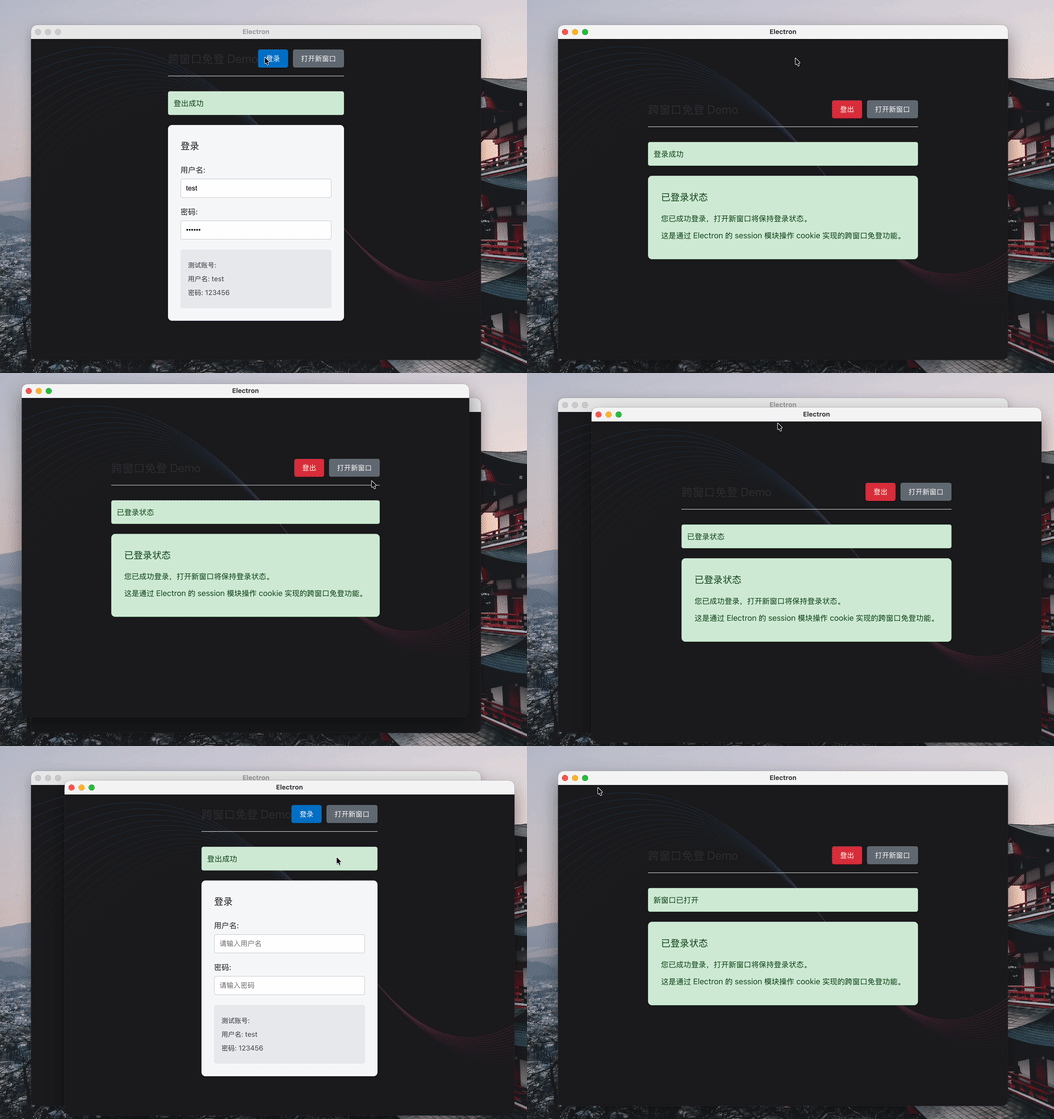
实现原理
Electron 应用中的所有窗口默认共享同一个会话(session),这是实现跨窗口免登的基础。通过在会话中设置认证 cookie,当用户打开新窗口时,新窗口会自动继承该会话的 cookie,从而保持登录状态。
实现步骤
1. 修改渲染进程(App.vue)
首先,我们需要修改渲染进程的界面,实现登录表单和相关功能:
<script setup lang="ts">
import { ref, onMounted } from 'vue'

const isLoggedIn = ref(false)
const username = ref('')
const password = ref('')
const message = ref('')
const isLoading = ref(false)

// 登录功能
const login = async () => {
  if (!username.value || !password.value) {
    message.value = '请输入用户名和密码'
    return
  }

  isLoading.value = true
  message.value = ''

  try {
    // 调用主进程的登录方法
    const result = await window.api.auth.login({
      username: username.value,
      password: password.value,
    })

    if (result.success) {
      isLoggedIn.value = true
      message.value = '登录成功'
      // 清空输入
      username.value = ''
      password.value = ''
    } else {
      message.value = result.message || '登录失败'
    }
  } catch (error) {
    message.value = `登录失败: ${error}`
  } finally {
    isLoading.value = false
  }
}

// 登出功能
const logout = async () => {
  isLoading.value = true
  message.value = ''

  try {
    // 调用主进程的登出方法
    const result = await window.api.auth.logout()
    if (result.success) {
      isLoggedIn.value = false
      message.value = '登出成功'
    } else {
      message.value = result.message || '登出失败'
    }
  } catch (error) {
    message.value = `登出失败: ${error}`
  } finally {
    isLoading.value = false
  }
}

// 检查登录状态
const checkLoginStatus = async () => {
  try {
    const result = await window.api.auth.checkStatus()
    isLoggedIn.value = result.loggedIn
    if (result.loggedIn) {
      message.value = '已登录状态'
    }
  } catch (error) {
    console.error('检查登录状态失败:', error)
  }
}

// 打开新窗口
const openNewWindow = async () => {
  try {
    await window.api.window.open()
    message.value = '新窗口已打开'
  } catch (error) {
    message.value = `打开新窗口失败: ${error}`
  }
}

// 组件挂载时检查登录状态
onMounted(() => {
  checkLoginStatus()
})
</script>

<template>
  <div class="auth-demo">
    <header class="header">
      <h1>跨窗口免登 Demo</h1>
      <div class="controls">
        <button
          v-if="!isLoggedIn"
          @click="login"
          :disabled="isLoading"
          class="btn btn-primary"
        >
          {{ isLoading ? '登录中...' : '登录' }}
        </button>
        <button
          v-else
          @click="logout"
          :disabled="isLoading"
          class="btn btn-danger"
        >
          {{ isLoading ? '登出中...' : '登出' }}
        </button>
        <button @click="openNewWindow" class="btn btn-secondary">
          打开新窗口
        </button>
      </div>
    </header>

    <div
      v-if="message"
      class="message"
      :class="{ error: message.includes('失败') }"
    >
      {{ message }}
    </div>

    <div v-if="!isLoggedIn" class="login-form">
      <h2>登录</h2>
      <div class="form-group">
        <label for="username">用户名:</label>
        <input
          type="text"
          id="username"
          v-model="username"
          placeholder="请输入用户名"
          :disabled="isLoading"
        />
      </div>
      <div class="form-group">
        <label for="password">密码:</label>
        <input
          type="password"
          id="password"
          v-model="password"
          placeholder="请输入密码"
          :disabled="isLoading"
        />
      </div>
      <div class="form-note">
        <p>测试账号:</p>
        <p>用户名: test</p>
        <p>密码: 123456</p>
      </div>
    </div>

    <div v-else class="user-info">
      <h2>已登录状态</h2>
      <p>您已成功登录,打开新窗口将保持登录状态。</p>
      <p>这是通过 Electron 的 session 模块操作 cookie 实现的跨窗口免登功能。</p>
    </div>
  </div>
</template>

<style scoped>
.auth-demo {
  padding: 20px;
  max-width: 600px;
  margin: 0 auto;
  font-family: -apple-system, BlinkMacSystemFont, 'Segoe UI', Roboto, sans-serif;
}

.header {
  display: flex;
  justify-content: space-between;
  align-items: center;
  margin-bottom: 30px;
  border-bottom: 1px solid #e0e0e0;
  padding-bottom: 15px;
}

.header h1 {
  margin: 0;
  color: #333;
  font-size: 24px;
}

.controls {
  display: flex;
  gap: 10px;
}

.btn {
  padding: 8px 16px;
  border: none;
  border-radius: 4px;
  cursor: pointer;
  font-size: 14px;
  transition: background-color 0.2s;
}

.btn:disabled {
  opacity: 0.6;
  cursor: not-allowed;
}

.btn-primary {
  background-color: #007acc;
  color: white;
}

.btn-primary:hover:not(:disabled) {
  background-color: #005a9e;
}

.btn-danger {
  background-color: #dc3545;
  color: white;
}

.btn-danger:hover {
  background-color: #c82333;
}

.btn-secondary {
  background-color: #6c757d;
  color: white;
}

.btn-secondary:hover {
  background-color: #5a6268;
}

.message {
  padding: 10px;
  margin: 10px 0 20px;
  border-radius: 4px;
  background-color: #d4edda;
  color: #155724;
  border: 1px solid #c3e6cb;
}

.message.error {
  background-color: #f8d7da;
  color: #721c24;
  border-color: #f5c6cb;
}

.login-form {
  background-color: #f8f9fa;
  padding: 25px;
  border-radius: 8px;
  box-shadow: 0 2px 4px rgba(0, 0, 0, 0.1);
}

.login-form h2 {
  margin-top: 0;
  margin-bottom: 20px;
  color: #333;
  font-size: 20px;
}

.form-group {
  margin-bottom: 15px;
}

.form-group label {
  display: block;
  margin-bottom: 5px;
  color: #555;
  font-weight: 500;
}

.form-group input {
  width: 100%;
  padding: 10px;
  border: 1px solid #ced4da;
  border-radius: 4px;
  font-size: 14px;
  box-sizing: border-box;
}

.form-group input:focus {
  outline: none;
  border-color: #007acc;
  box-shadow: 0 0 0 0.2rem rgba(0, 122, 204, 0.25);
}

.form-note {
  margin-top: 20px;
  padding: 15px;
  background-color: #e9ecef;
  border-radius: 4px;
  font-size: 14px;
}

.form-note p {
  margin: 5px 0;
  color: #495057;
}

.user-info {
  background-color: #d4edda;
  padding: 25px;
  border-radius: 8px;
  border: 1px solid #c3e6cb;
}

.user-info h2 {
  margin-top: 0;
  margin-bottom: 15px;
  color: #155724;
  font-size: 20px;
}

.user-info p {
  margin: 10px 0;
  color: #155724;
  line-height: 1.5;
}
</style>
2. 修改主进程(index.ts)
在主进程中,我们需要添加认证相关的 IPC 处理函数:
// =============================
// 认证功能(跨窗口免登)
// =============================
ipcMain.handle(
  'auth:login',
  async (_, credentials: { username: string; password: string }) => {
    console.log('🚀 ~ credentials:', credentials)
    try {
      // 模拟登录验证
      if (
        credentials.username === 'test' &&
        credentials.password === '123456'
      ) {
        // 获取默认会话
        const defaultSession = session.defaultSession

        // 尝试设置认证 cookie
        try {
          await defaultSession.cookies.set({
            url: 'http://localhost:3000', // 添加端口号
            name: 'auth_token',
            value: 'test_auth_token_123456',
            httpOnly: true,
            secure: false,
            sameSite: 'lax', // 调整 sameSite 值
            expirationDate: Date.now() + 86400000, // 添加过期时间(1天)
          })
          console.log('Cookie 设置成功')
        } catch (cookieError) {
          console.error('设置 Cookie 失败:', cookieError)
          // 尝试不设置 sameSite 参数
          try {
            await defaultSession.cookies.set({
              url: 'http://localhost:3000',
              name: 'auth_token',
              value: 'test_auth_token_123456',
              httpOnly: true,
              secure: false,
              expirationDate: Date.now() + 86400000,
            })
            console.log('Cookie 设置成功(无 sameSite)')
          } catch (secondError) {
            console.error('第二次设置 Cookie 失败:', secondError)
            throw secondError
          }
        }

        return { success: true, message: '登录成功' }
      } else {
        return { success: false, message: '用户名或密码错误' }
      }
    } catch (error) {
      console.error('登录失败:', error)
      return { success: false, message: `登录失败: ${error.message}` }
    }
  }
)

ipcMain.handle('auth:logout', async () => {
  try {
    // 获取默认会话
    const defaultSession = session.defaultSession

    // 清除认证 cookie
    await defaultSession.cookies.remove('http://localhost:3000', 'auth_token')

    return { success: true, message: '登出成功' }
  } catch (error) {
    console.error('登出失败:', error)
    return { success: false, message: `登出失败: ${error.message}` }
  }
})

ipcMain.handle('auth:checkStatus', async () => {
  try {
    // 获取默认会话
    const defaultSession = session.defaultSession

    // 检查认证 cookie 是否存在
    const cookies = await defaultSession.cookies.get({
      url: 'http://localhost:3000',
      name: 'auth_token',
    })

    console.log('检查登录状态:', cookies)
    return { loggedIn: cookies.length > 0 }
  } catch (error) {
    console.error('检查登录状态失败:', error)
    return { loggedIn: false }
  }
})

// 打开新窗口
ipcMain.handle('window:open', () => {
  try {
    // 创建一个新的浏览器窗口
    const newWindow = new BrowserWindow({
      width: 900,
      height: 670,
      show: false,
      autoHideMenuBar: true,
      ...(process.platform === 'linux' ? { icon } : {}),
      webPreferences: {
        preload: join(__dirname, '../preload/index.js'),
        sandbox: false,
      },
    })

    newWindow.on('ready-to-show', () => {
      newWindow.show()
    })

    if (is.dev && process.env['ELECTRON_RENDERER_URL']) {
      newWindow.loadURL(process.env['ELECTRON_RENDERER_URL'])
    } else {
      newWindow.loadFile(join(__dirname, '../renderer/index.html'))
    }

    return { success: true }
  } catch (error) {
    console.error('打开新窗口失败:', error)
    return { success: false, message: '打开新窗口失败' }
  }
})
3. 修改预加载脚本(preload/index.ts)
在预加载脚本中,我们需要添加认证和窗口管理相关的 API 接口:
const api = {
  // 认证功能
  auth: {
    login: (credentials: { username: string; password: string }) =>
      electronAPI.ipcRenderer.invoke('auth:login', credentials),
    logout: () => electronAPI.ipcRenderer.invoke('auth:logout'),
    checkStatus: () => electronAPI.ipcRenderer.invoke('auth:checkStatus'),
  },

  // 窗口管理功能
  window: {
    open: () => electronAPI.ipcRenderer.invoke('window:open'),
  },
}
4. 修改类型定义文件(preload/index.d.ts)
最后,我们需要更新类型定义文件,确保 TypeScript 能够正确识别新添加的 API 接口:
import { ElectronAPI } from '@electron-toolkit/preload'

interface AuthAPI {
  login: (credentials: { username: string; password: string }) => Promise<{
    success: boolean
    message: string
  }>
  logout: () => Promise<{
    success: boolean
    message: string
  }>
  checkStatus: () => Promise<{
    loggedIn: boolean
  }>
}

interface WindowAPI {
  open: () => Promise<{
    success: boolean
    message?: string
  }>
}

declare global {
  interface Window {
    electron: ElectronAPI
    api: {
      clipboard: ClipboardAPI
      auth: AuthAPI
      window: WindowAPI
    }
  }
}
遇到的问题与解决方案
在实现过程中,我遇到了 "Setting cookie failed" 的错误。经过调试,发现主要问题是 cookie 设置参数的问题:
- URL 问题:需要使用完整的 URL(包括端口号)
- sameSite 参数问题:某些版本的 Electron 可能对
sameSite参数的支持有限 - 缺少过期时间:建议为 cookie 设置合理的过期时间
解决方案:
- 使用完整的 URL(如
http://localhost:3000) - 调整
sameSite值为lax - 添加
expirationDate参数 - 添加错误处理,当设置 cookie 失败时尝试不设置
sameSite参数
Loading...